
A privacy notice tells your patients how you handle their health information. Privacy law expects you to have one. Materia+ gives you a template to start from.
Where patients see it
Patients see your notice when they book with you, and their consent is recorded against the version they saw. There's also a link to it on your profile.
Review and publish it
- Open Settings → Privacy notice.
- Check Written for: the region it's written for, based on your practice address.
- Add your privacy contact: who patients contact to see their record or ask a privacy question. Usually you.
- Tick who else may see patient information: staff or assistants in your practice, insurers (when a patient asks you to send a receipt or report), or labs.
- Say how long you keep records. Check your college's or regulator's rule.
- Add anything else, if you need to.
- Read the preview, then press Publish notice.
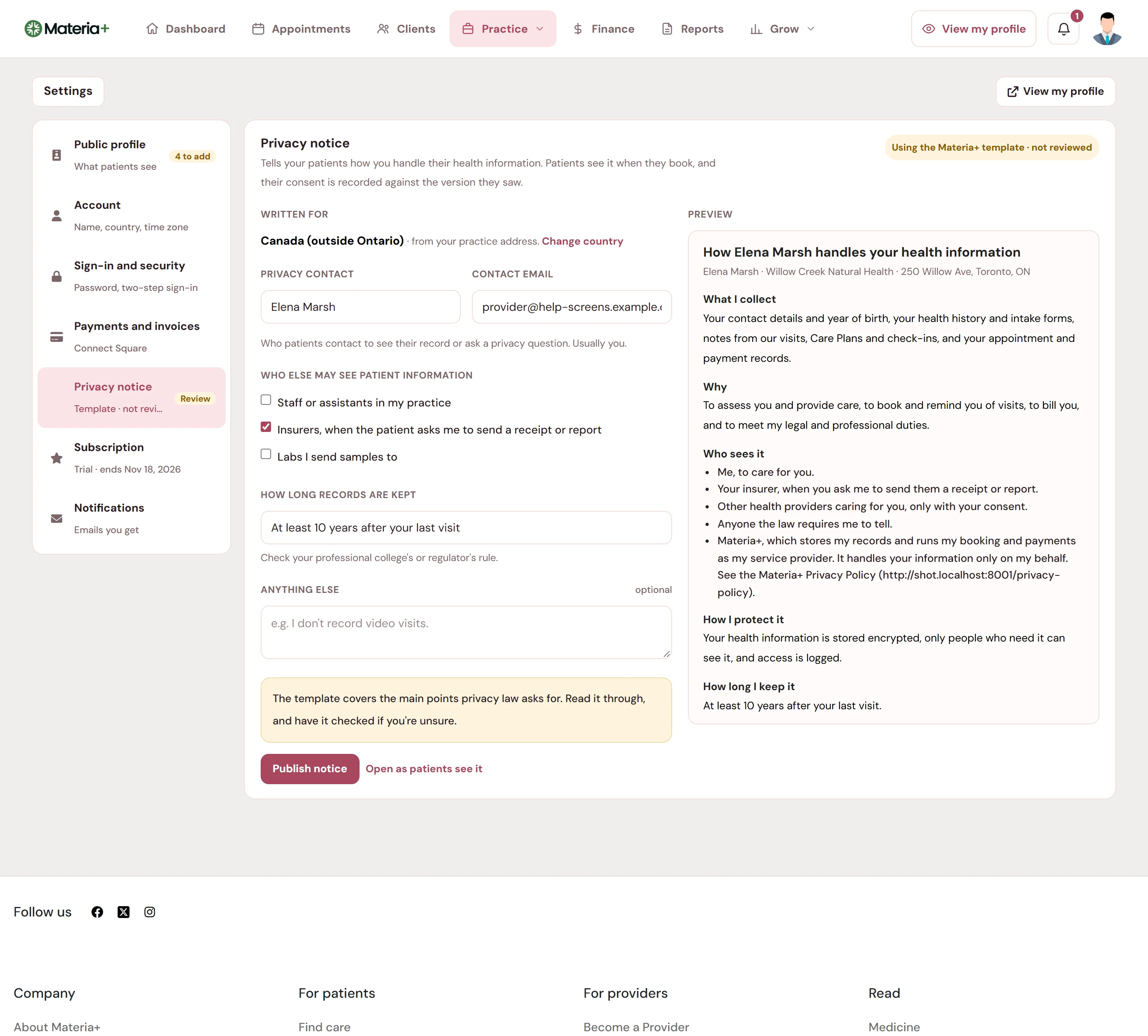
Until you publish, patients see the Materia+ template filled in with your details, and Settings shows it as not reviewed.
Changing it later
Each time you publish, you create a new version. Earlier versions are kept, so you always know which one each patient agreed to.
The template covers the main points privacy law asks for. Read it through, and have it checked if you're unsure. Materia+ can't give you legal advice.