
Check-ins are a quick way for clients to tell you how things are going between visits. They're there to prepare for the next visit, not to watch your clients day to day.
Turn on check-ins
When you write or edit a care plan, turn on check-ins, then choose:
- How often: every day, every 3 days, every week or every 2 weeks.
- Up to 3 questions, each up to 60 characters. Each is either a "How is…" question (answered Better, Same or Worse) or a "Did you…" question (answered Yes, Partly or No).
For example: "How is your sleep this week?" and "Did you keep your evening routine?"
Reading check-ins
Check-ins appear on the care plan, newest first, with any note the client added. A short summary of check-ins since the last visit is on the client's Overview, so you can glance at it before they arrive.
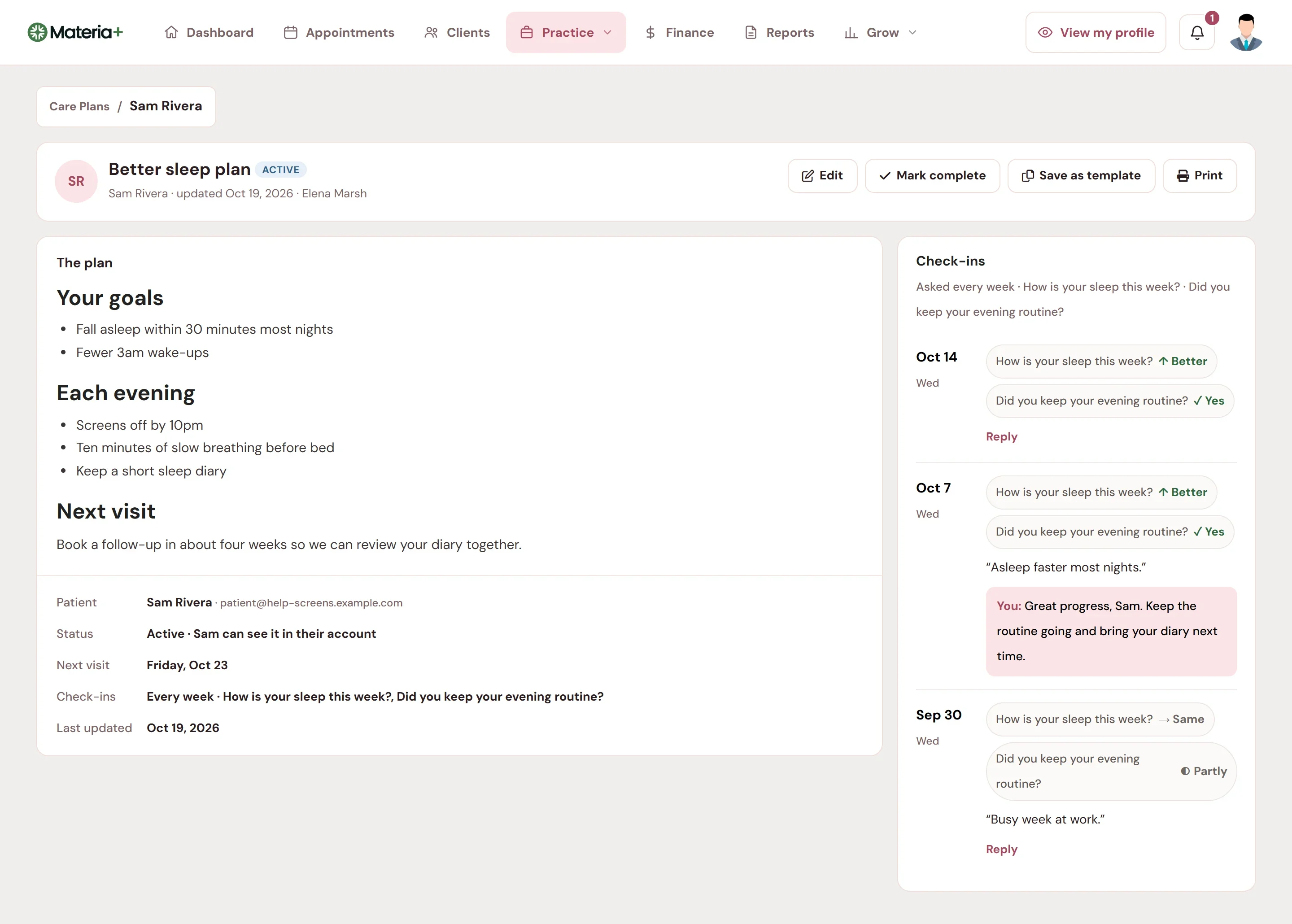
You can reply to a check-in. The client sees your reply on their plan.
No alerts, on purpose
- We don't email you or alert you about check-ins. You'll see them at the client's next appointment.
- Clients are told check-ins aren't watched in real time and aren't for emergencies, and to book a visit if they're getting worse.
Psychotherapy plans
On psychotherapy plans, clients answer the questions but can't add a note.