

Learn how to set your availability for specific days
Updated less than a month ago
Materia+ enables providers to designate their working hours for specific days. This feature is particularly useful when providers face days that could disrupt their regular availability.
To set availability for a custom day, navigate to My Schedule and click Update for the desired day of the week. Next, choose the Custom [Day] option (for instance, if you're setting availability for a specific Monday, select Custom Monday).
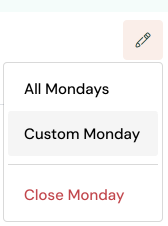
Select the specific Monday you want to configure and then select your available times within the time slots.
Note: Please remember to adjust your availability for custom days in advance, and to verify any scheduled appointments for that day.